Every website project starts with the same fork in the road: build it as a static site, or build it on WordPress. Agencies often default to whichever they're more comfortable with, but that's the wrong reason to choose. The right answer depends on one question — how will you actually use the site after it launches?
What a static site gets you
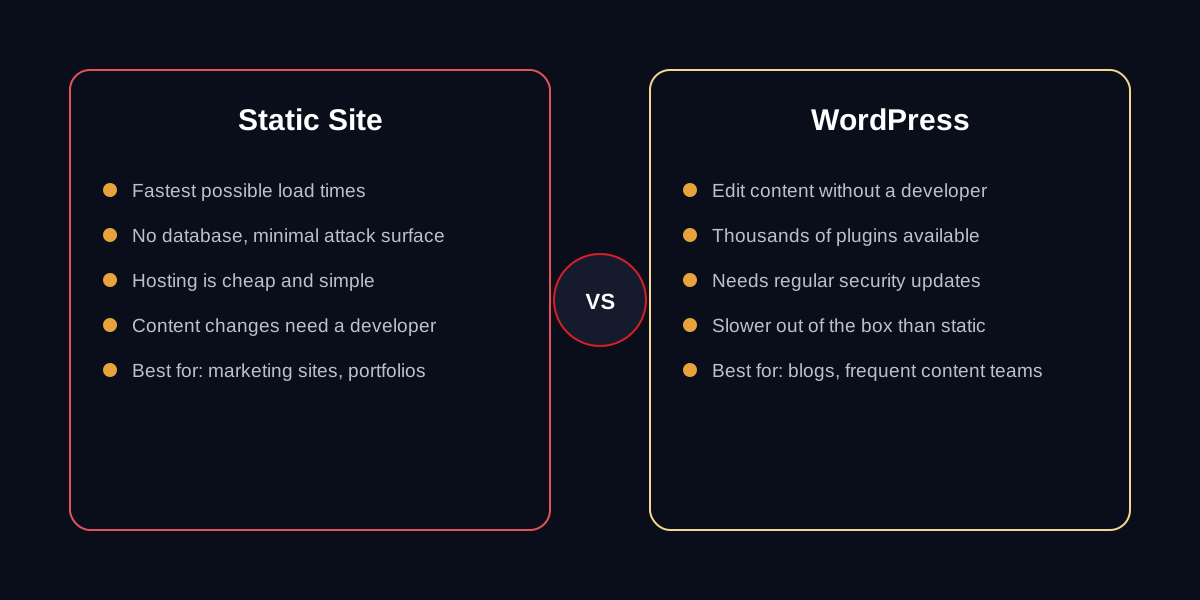
A static site is pre-built HTML, CSS and JavaScript with no database and no server-side processing. There's nothing for a hacker to exploit and nothing to slow down under load, which is why static sites routinely hit 95+ on Google's Lighthouse performance score without any special tuning.
- Near-instant load times, even on slow connections
- No database means no SQL injection risk and no plugin vulnerabilities
- Hosting is cheap — often just a CDN, no server to patch or maintain
The tradeoff: adding a new page, updating a price, or publishing a new post means editing code. If your site is mostly "set it and forget it" — a portfolio, a company profile, a landing page for ads — that's a fair trade for the speed and security you get in return.
What WordPress gets you
WordPress trades some of that raw speed for editorial freedom. Once it's set up, anyone on your team can add a blog post, swap an image, or update a service page without touching code. That matters enormously if content is part of your growth strategy — regular blog posts, an events calendar, a jobs board that changes weekly.
The tradeoff runs the other way: a database and server-side rendering mean WordPress needs ongoing maintenance — core updates, plugin updates, and a security posture that static sites don't require at all. Done properly, a well-built WordPress site can still be fast; done carelessly, it becomes the slow, plugin-bloated sites WordPress has a reputation for.
The middle ground we build most often
In practice, a lot of businesses don't need a pure either/or. We frequently build the core marketing pages as static — the homepage, services, about — for maximum speed and security, and add a lightweight, headless content layer just for the blog or news section that non-technical staff need to update. It's more setup work, but it means you're not paying WordPress's maintenance tax on pages that never change anyway.
Whichever direction fits, the decision should come before a single line of design work starts — it affects the whole build, not just the CMS you bolt on at the end.